Finding The Bug
The current advancement of the project
At the time of writing this, the project has advanced quite a lot and we added many features. It’s still missing a GPU and user input, but we have a nice debugger UI to help us find bugs and test the emulator.
And boy oh boy did we make the right choice to add that debugger. It helped me find the source of the terrible “bug” we stumbled upon and got us stuck for a quite a long time.
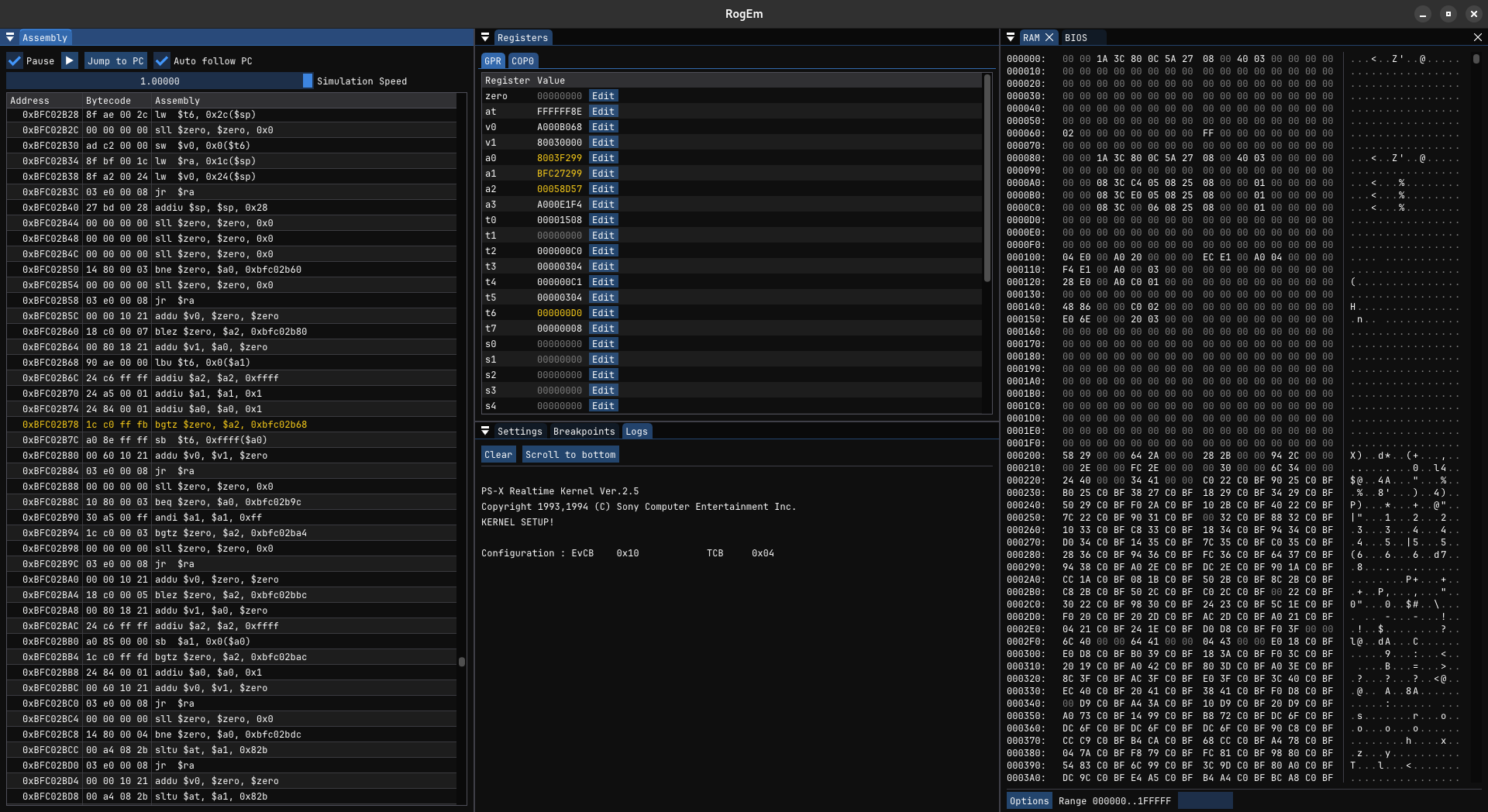 The Current debugger UI of the RogEm emulator
The Bug: Memory is Wiped
Okay so to put everything into context, we had implemented almost every CPU instruction and a simple bus which allowed the CPU to access BIOS and RAM memory, as well as a basic Coprocessor 0. With that I was able to load the BIOS into memory and then start executing the code from the CPU reset vector OxBFC00000.
Everything worked pretty well, the BIOS started initializing the RAM, resetting the CPU registers, copying BIOS functions to RAM, until at some point RAM was completely wiped clean.
This meant that all the code required for the console to work (exception handler, function tables, etc) didn’t exist anymore…
At first we thought we had done something wrong when writing to memory but nothing we tried fixed the issue. The only solution was to set A LOT of breakpoints throughout the code and stepped through each instruction, trying to find were the issue was coming from.
Finally we managed to narrow down the code section where the memory was overwritten: 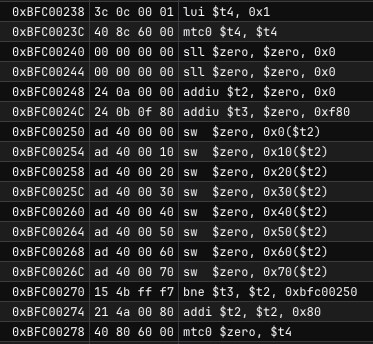 Section of instructions that clear a whole memory region in RAM
The code above clears 4096 bytes of memory from address 0x0 to address 0x1000, which is coherent with what the CPU was doing to RAM i.e. nuking the RAM…
If you look at address 0xBFC00238 and 0xBFC0023C you have these two instructions:
lui $t4, 0x1 <- load $t4 upper bytes to 0x1 i.e. $t4 = 0x00010000
mtc0 $sr, $t4 <- move value in $t4 to COP0 status register (SR)
And if you didn’t already figure it out, this was the part in the documentation I missed.
The Culprit: The System Control Coprocessor
The MIPS R300A CPU can have up to 4 coprocessors. One of them is mandatory in the specification and is the coprocessor 0 AKA the System Control Coprocessor. As its name implies it’s used to control and store the system’s state while the console is running.
mtc0 $sr, $t4 sets the status register of the coprocessor 0 to he value contained in $t4. This means that the status register of COP0 is effectively 0x00010000. If you know a little about the status register, you would know that it’s important to check it when running the CPU. The COP0 status register bit 16 is set by the mtc0 instruction.
16 Isc Isolate Cache (0=No, 1=Isolate) When isolated, all load and store operations are targetted to the Data cache, and never the main memory. (Used by PSX Kernel, in combination with Port
0xFFFE0130)
This is exactly what we missed, Cache Isolation. It clearly explains that when the IsC bit (bit 16 - Isolate Cache) is set, every write goes to the CPU cache memory and never to main memory.
There are 2 fixes for this:
- Implement the CPU cache (time consuming, not a priority and optional for now)
- Just check if the IsC bit is set and ignore the write to memory if it’s the case (fast and easy)
We obviously chose option 2…
We will certainly implement the cache at some point later in the development of RogEm but for now it works and we could go back to work improving the emulator.